Plotting Market Data
[1]:
from kraken.spot import Market
[2]:
import matplotlib.pyplot as plt
import numpy as np
import pandas as pd
1. Create the unauthenticated market client
[3]:
market = Market()
2. Get the OHLC data of the XBTUSD pair, create the dataframe, and set the time index
[4]:
df = pd.DataFrame(
    market.get_ohlc(pair='XBTUSD', interval=60)['XXBTZUSD'],
    columns=['time', 'open', 'high', 'low', 'close', 'vwap', 'volume', 'count']
).astype(float)
# df = df.set_index('time')
df['time'] = pd.to_datetime(df['time'], unit='s')
df = df.sort_values(by='time')
df
[4]:
| time | open | high | low | close | vwap | volume | count | |
|---|---|---|---|---|---|---|---|---|
| 0 | 2024-03-02 12:00:00 | 61917.8 | 62223.7 | 61911.4 | 62142.4 | 62048.6 | 15.260659 | 616.0 |
| 1 | 2024-03-02 13:00:00 | 62142.4 | 62142.4 | 61900.0 | 61900.0 | 62006.8 | 50.357137 | 727.0 |
| 2 | 2024-03-02 14:00:00 | 61900.1 | 61971.8 | 61663.3 | 61891.7 | 61832.5 | 281.512303 | 1538.0 |
| 3 | 2024-03-02 15:00:00 | 61891.8 | 62032.2 | 61810.0 | 61836.8 | 61941.1 | 38.815926 | 886.0 |
| 4 | 2024-03-02 16:00:00 | 61836.8 | 62022.3 | 61714.9 | 61930.8 | 61839.0 | 181.980102 | 1261.0 |
| ... | ... | ... | ... | ... | ... | ... | ... | ... |
| 715 | 2024-04-01 07:00:00 | 69680.1 | 69788.8 | 69562.0 | 69671.7 | 69676.0 | 40.187037 | 767.0 |
| 716 | 2024-04-01 08:00:00 | 69671.8 | 69671.8 | 69244.7 | 69450.0 | 69445.2 | 91.352301 | 1017.0 |
| 717 | 2024-04-01 09:00:00 | 69450.1 | 69613.4 | 69448.6 | 69448.7 | 69510.3 | 46.275460 | 731.0 |
| 718 | 2024-04-01 10:00:00 | 69448.7 | 69604.4 | 69353.0 | 69601.1 | 69454.0 | 23.874609 | 556.0 |
| 719 | 2024-04-01 11:00:00 | 69601.2 | 69850.1 | 69601.1 | 69666.1 | 69732.8 | 20.962756 | 455.0 |
720 rows × 8 columns
3. Compute some indicatoes based on the loaded data
[5]:
# compute ema
df['ema21'] = df['close'].ewm(span=21, adjust=False, min_periods=21).mean()
df['ema50'] = df['close'].ewm(span=50, adjust=False, min_periods=50).mean()
df['ema200'] = df['close'].ewm(span=200, adjust=False, min_periods=200).mean()
[6]:
def support_and_resistance(df: pd.DataFrame, lookback: int=200, levels: int=3) -> dict:
    ''' Returns up to 3 support and resistance levels by given dataframe '''
    high = df['high'][-lookback:].max()
    low = df['low'][-lookback:].min()
    close = df['close'][-lookback:].iloc[-1]

    pp = (high + low + close) / 3
    s1 = 2 * pp - high
    r1 = 2 * pp - low
    if levels >= 2:
        s2 = pp - (high - low)
        r2 = pp + (high - low)
        if levels >= 3:
            s3 = low - 2 * (high -pp)
            r3 = high + 2 * (pp - low)
            return { 's1': s1, 's2': s2, 's3': s3, 'r1': r1, 'r2': r2, 'r3': r3 }
        return { 's1': s1, 's2': s2, 'r1': r1, 'r2': r2 }
    return { 's1': s1,  'r2': r1 }
[7]:
# compute support and resistance levels
for i, row in enumerate(df.index):
    try:
        srlevels = support_and_resistance(df.iloc[:i], lookback=50, levels=2)
        df.at[row, 's1'] = srlevels['s1']
        df.at[row, 'r1'] = srlevels['r1']
        df.at[row, 's2'] = srlevels['s2']
        df.at[row, 'r2'] = srlevels['r2']
    except:
        df.at[row, 's1'] = np.NaN
        df.at[row, 'r1'] = np.NaN
        df.at[row, 's2'] = np.NaN
        df.at[row, 'r2'] = np.NaN

# isn't that a beauty?:
df
[7]:
| time | open | high | low | close | vwap | volume | count | ema21 | ema50 | ema200 | s1 | r1 | s2 | r2 | |
|---|---|---|---|---|---|---|---|---|---|---|---|---|---|---|---|
| 0 | 2024-03-02 12:00:00 | 61917.8 | 62223.7 | 61911.4 | 62142.4 | 62048.6 | 15.260659 | 616.0 | NaN | NaN | NaN | NaN | NaN | NaN | NaN |
| 1 | 2024-03-02 13:00:00 | 62142.4 | 62142.4 | 61900.0 | 61900.0 | 62006.8 | 50.357137 | 727.0 | NaN | NaN | NaN | 61961.300000 | 62273.600000 | 61780.200000 | 62404.800000 |
| 2 | 2024-03-02 14:00:00 | 61900.1 | 61971.8 | 61663.3 | 61891.7 | 61832.5 | 281.512303 | 1538.0 | NaN | NaN | NaN | 61792.100000 | 62115.800000 | 61684.200000 | 62331.600000 |
| 3 | 2024-03-02 15:00:00 | 61891.8 | 62032.2 | 61810.0 | 61836.8 | 61941.1 | 38.815926 | 886.0 | NaN | NaN | NaN | 61628.766667 | 62189.166667 | 61365.833333 | 62486.633333 |
| 4 | 2024-03-02 16:00:00 | 61836.8 | 62022.3 | 61714.9 | 61930.8 | 61839.0 | 181.980102 | 1261.0 | NaN | NaN | NaN | 61592.166667 | 62152.566667 | 61347.533333 | 62468.333333 |
| ... | ... | ... | ... | ... | ... | ... | ... | ... | ... | ... | ... | ... | ... | ... | ... |
| 715 | 2024-04-01 07:00:00 | 69680.1 | 69788.8 | 69562.0 | 69671.7 | 69676.0 | 40.187037 | 767.0 | 70380.082934 | 70315.531093 | 69369.034227 | 68659.500000 | 71012.200000 | 67639.000000 | 72344.400000 |
| 716 | 2024-04-01 08:00:00 | 69671.8 | 69671.8 | 69244.7 | 69450.0 | 69445.2 | 91.352301 | 1017.0 | 70295.529940 | 70281.588697 | 69369.839856 | 68653.966667 | 71006.666667 | 67636.233333 | 72341.633333 |
| 717 | 2024-04-01 09:00:00 | 69450.1 | 69613.4 | 69448.6 | 69448.7 | 69510.3 | 46.275460 | 731.0 | 70218.545400 | 70248.926395 | 69370.624534 | 68506.166667 | 70858.866667 | 67562.333333 | 72267.733333 |
| 718 | 2024-04-01 10:00:00 | 69448.7 | 69604.4 | 69353.0 | 69601.1 | 69454.0 | 23.874609 | 556.0 | 70162.414000 | 70223.521439 | 69372.917823 | 68505.300000 | 70858.000000 | 67561.900000 | 72267.300000 |
| 719 | 2024-04-01 11:00:00 | 69601.2 | 69850.1 | 69601.1 | 69666.1 | 69732.8 | 20.962756 | 455.0 | 70117.294545 | 70201.661774 | 69375.835058 | 68606.900000 | 70959.600000 | 67612.700000 | 72318.100000 |
720 rows × 15 columns
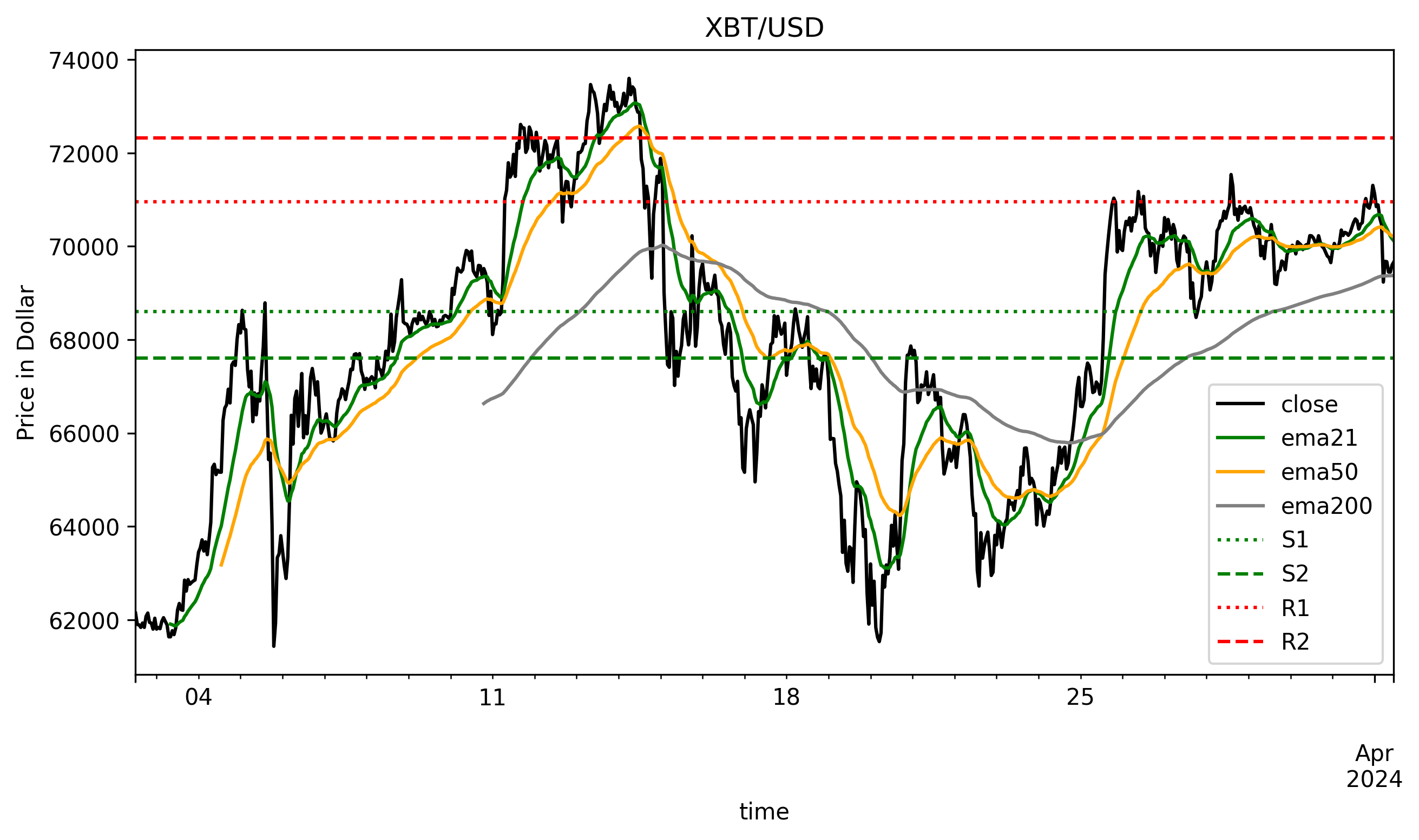
4. Plot the results
[8]:
fig = plt.figure(figsize=(10,5), dpi=300)
ax = plt.gca()
df.plot(x='time', y=['close', 'ema21', 'ema50', 'ema200'], ax=ax, color=['black', 'green', 'orange', 'gray'])

xmin, xmax = df['time'].iloc[0], df['time'].iloc[-1]
ax.hlines(y=df['s1'].iloc[-1], xmin=xmin, xmax=xmax, color='green', linestyle=':', label='S1')
ax.hlines(y=df['s2'].iloc[-1], xmin=xmin, xmax=xmax, color='green', linestyle='--', label='S2')
ax.hlines(y=df['r1'].iloc[-1], xmin=xmin, xmax=xmax, color='red', linestyle=':', label='R1')
ax.hlines(y=df['r2'].iloc[-1], xmin=xmin, xmax=xmax, color='red', linestyle='--', label='R2')
ax.set_ylabel('Price in Dollar')
plt.legend()
plt.title('XBT/USD');
… Create and combine custom indicators, implement them, and build your own strategies …
[ ]: